DRAM, from one cell to the grid
title: "DRAM, from one cell to the grid"
description: "Start from one bucket of charge and finish at the 1T1C schematic. One cell, one wordline, one bitline at a time. The whole chip can wait." date: 2026-09-22 author: Casper Hansen tags: ["Hardware", "Memory", "DRAM"] thumbnail: images/cover.png series: memory series_order: 1 draft: true
DRAM, from one cell to the grid
Start from one bucket of charge and finish at the 1T1C schematic. One cell, one wordline, one bitline at a time. The whole chip can wait.
September 22, 2026 · Hardware, Memory, DRAM
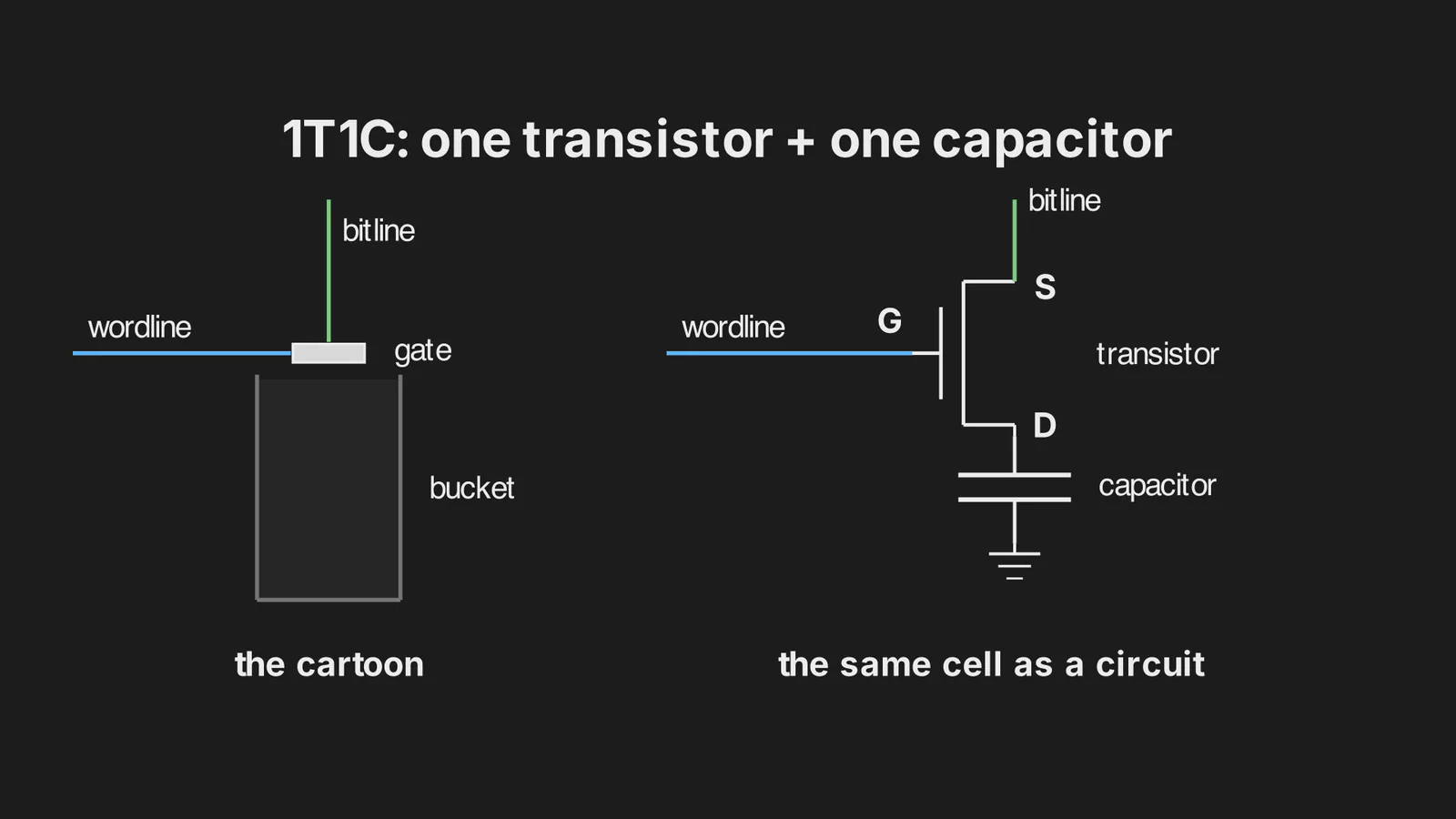
When I first tried to learn how DRAM works, I opened a JEDEC spec and tried to read diagrams and tables. This is one way to learn, but it's a crude learning experience. Personally, I learn most from a combination of visuals and text that complements those visuals, so this is what I try to pass on to you in this writeup.
Starting at the chip level is a bit too abstract to understand DRAM because it consists of billions of microscopic buckets that hold electric charge with logic controlling them. Instead, I would propose we start at the lowest level and work our way up.
Let's start by addressing: what does one bucket contain and how does it work?
One cell
A bucket holds electric charge. When the bucket is nearly full, we read 1, and when it is nearly empty, we read 0. This is the first part of a cell. For now, let's just appreciate that electric charge can be read as bits, and later we will explore the decision of is this a 1 or a 0?
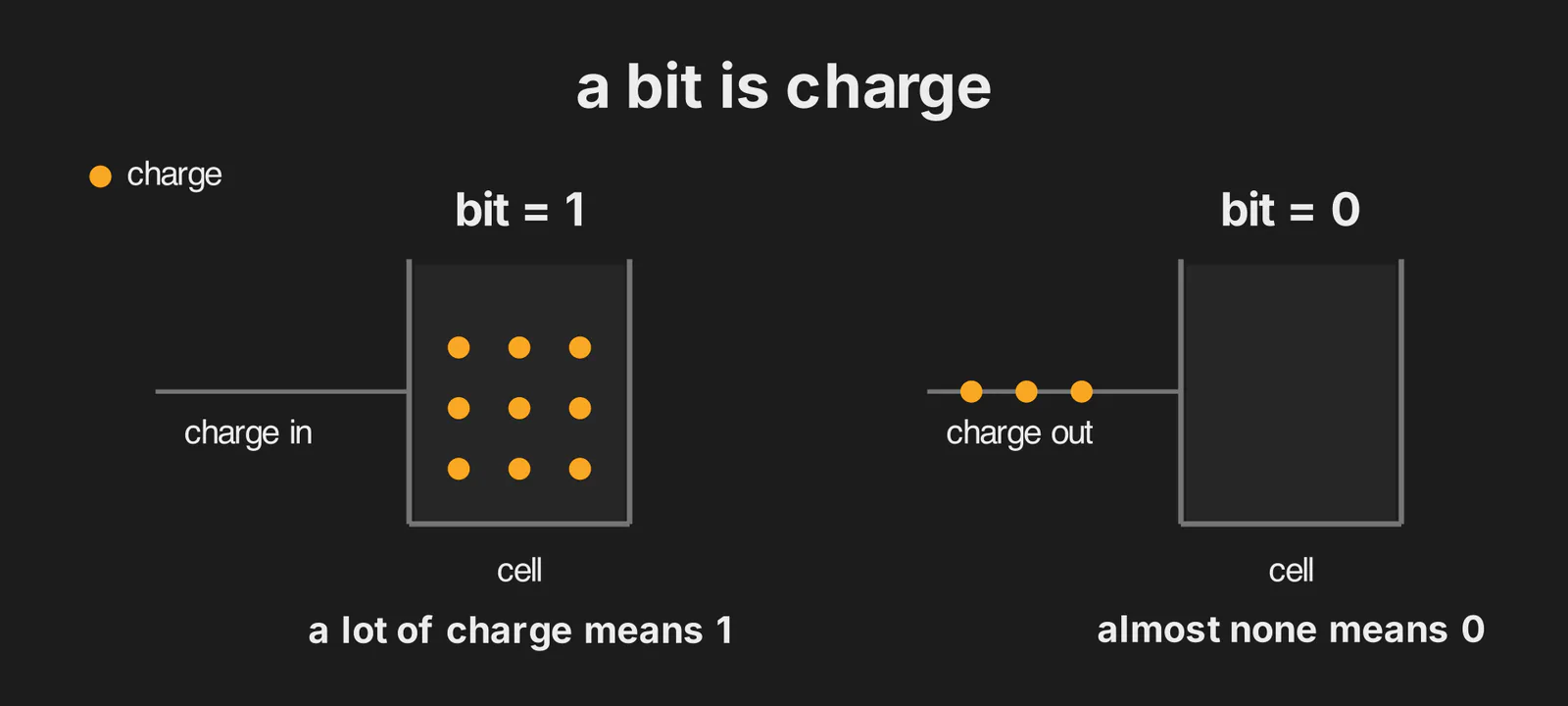
DRAM is essentially about somewhere to put charge and how to control it.
Controlling DRAM happens through gating. We can't just let charge drift in and out, so instead we slap a door on it to control when charge enters and leaves. When this door is open, charge can flow in either direction. This door is the gate and the second part of the cell.
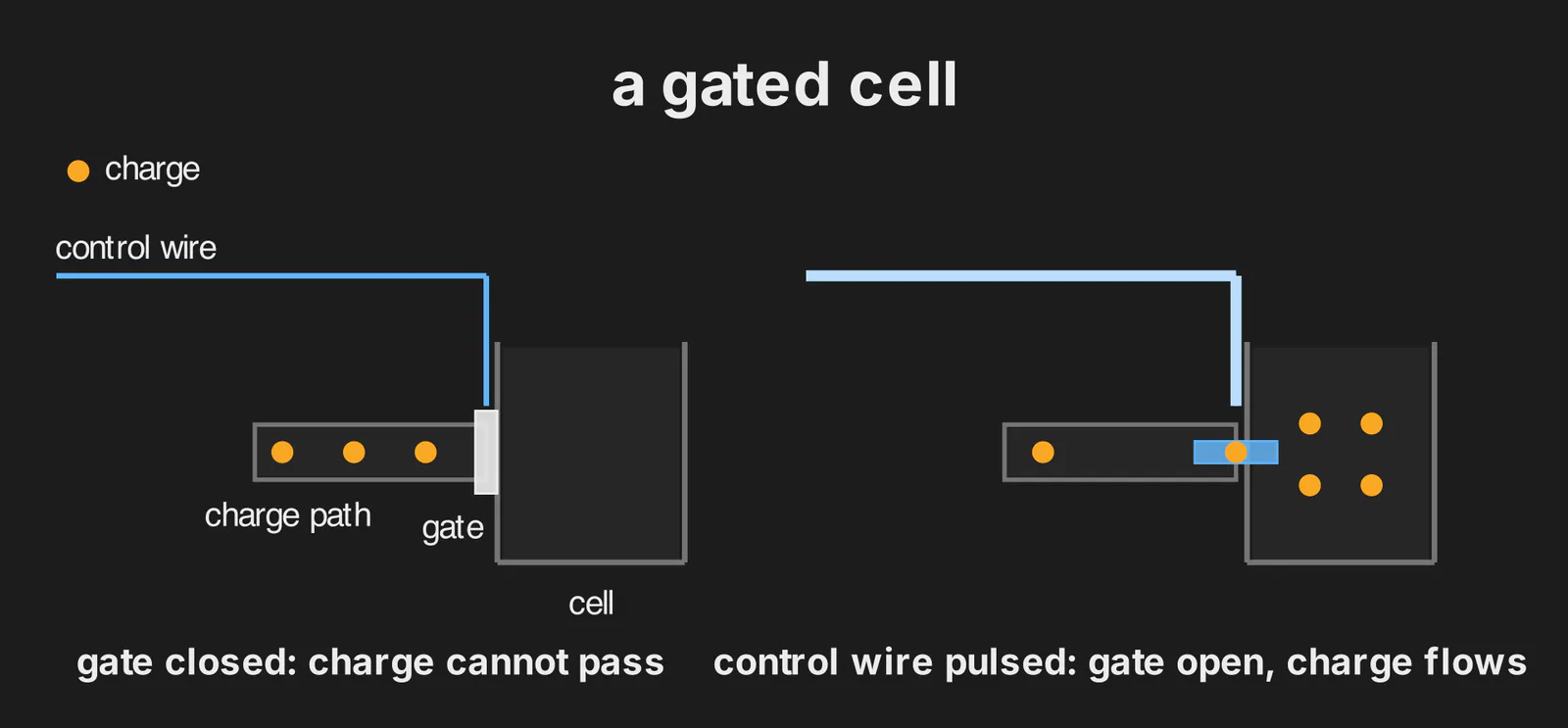
What opens the gate? This gate is controlled by a control wire that connects to the gate. This control wire can receive high or low voltage which we refer to as just high or low from here on out.
When we send high to the control wire, the gate opens. The gate stays open until we send a low to the control wire. We usually do a quick high-then-low (pulse) which leaves a short window of opportunity for a read or write of the cell.
Now, how do we read or write? This is where another wire comes into the picture: the data wire. If we start with writing, we can simply decide to send a high or low to the data wire. If high, we write a 1, and if low, we write a 0. After the pulse is done, the gate is now closed and the cell holds the value we wrote, at least for a while.
The cell doesn't "know" which one is happening. It just lets charge equalize between itself and the data wire for as long as the gate is open. Writing is a side effect of opening the door to an already-prepared wire.
And reading? Same trick run backwards. We start with an empty data wireReal chips don't start from the empty wire we drew. They park every data wire at half the supply voltage first, a step called precharge, so a stored 1 nudges the wire up and a stored 0 nudges it down, and the detector decides which way it moved. The detector's own post picks that up., pulse the control wire, and let a small detector at the far end of the wire watch for charge arriving.
This is the paragraph to read twice. Reading is destructive. The same pulse that exposes the cell also drains it, so real DRAM has to write the value back immediately after every read. Add leakage (even cells nobody touches lose their charge over time) and you get a memory that has to be continually rewritten just to keep what it already holds. That's the "dynamic" in DRAM, and it's why DRAM has a refresh cycle. How often? Every cell on a modern chip gets rewritten at least once every 64 millisecondsThat's the DDR4 window at normal temperature: 8,192 refresh commands spread over 64 ms, one every 7.8 microseconds. Above 85 °C the spec doubles the rate, and DDR5 makes 32 ms the normal window, so "at least once every 64 ms" holds for any chip you can buy today., whether or not anything asked to read it. That side of the story picks up in a later post on asynchronous DRAM.
Keep an eye on the detector, because it matters just as much as the cell and it gets its own post later in the series. The cell doesn't report a digit. It dribbles a small amount of charge onto a long noisy wire, and a circuit at the far end has to decide what to make of the result.
DRAM stores charge, then measures it.
A grid of cells
We have one cell. A chip needs billions. How do we get from one to billions without also running billions of wires?
Let's start with the box. A chip is one piece of silicon, about 6 by 6 millimetres for a 16-gigabit die made in 20246 × 6 mm is 36 mm². TechInsights' 2024 teardowns put the 16 Gb dies from Samsung, SK hynix and Micron between 36.7 and 38.0 mm², so our 6 by 6 is a rounding. A 16 Gb die on a 2020-era node was closer to 65 mm²., carrying 16 billion cells like the one we just built, one per bit. If you've never seen what's inside the silicon, there's a foundation post on that.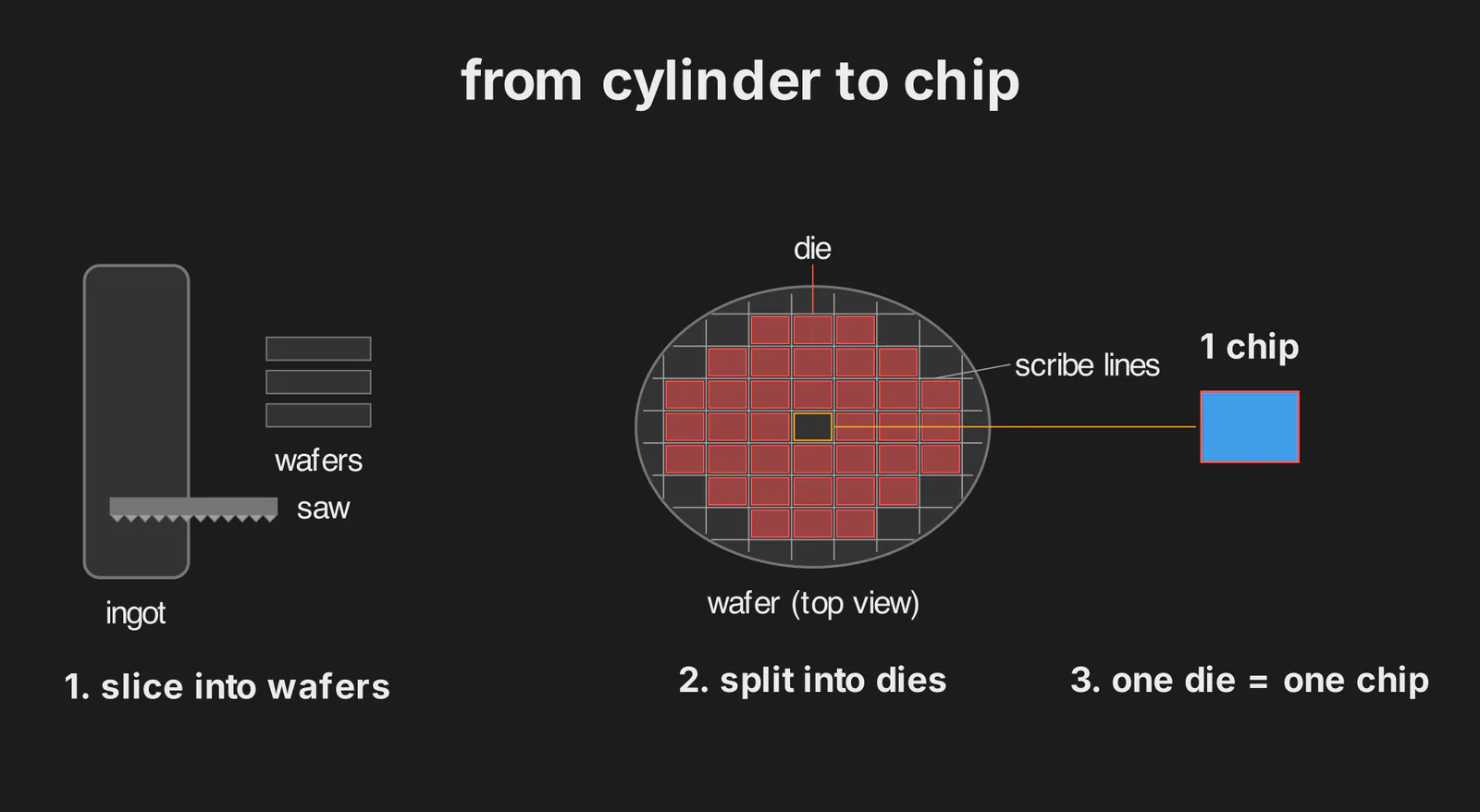 Where the box comes from, in three panels borrowed from the silicon post: wafers sawn off an ingot, a wafer split into dies by scribe lines, one die lifted out as a chip. Around 1,800 of our 16 Gb dies fit on one 300 mm wafer. For now the chip is just the box our grid lives in.
The cells inside the box aren't piled up at random. They sit in a regular 2D layout, so every cell is reachable by exactly one row choice and one column choice.
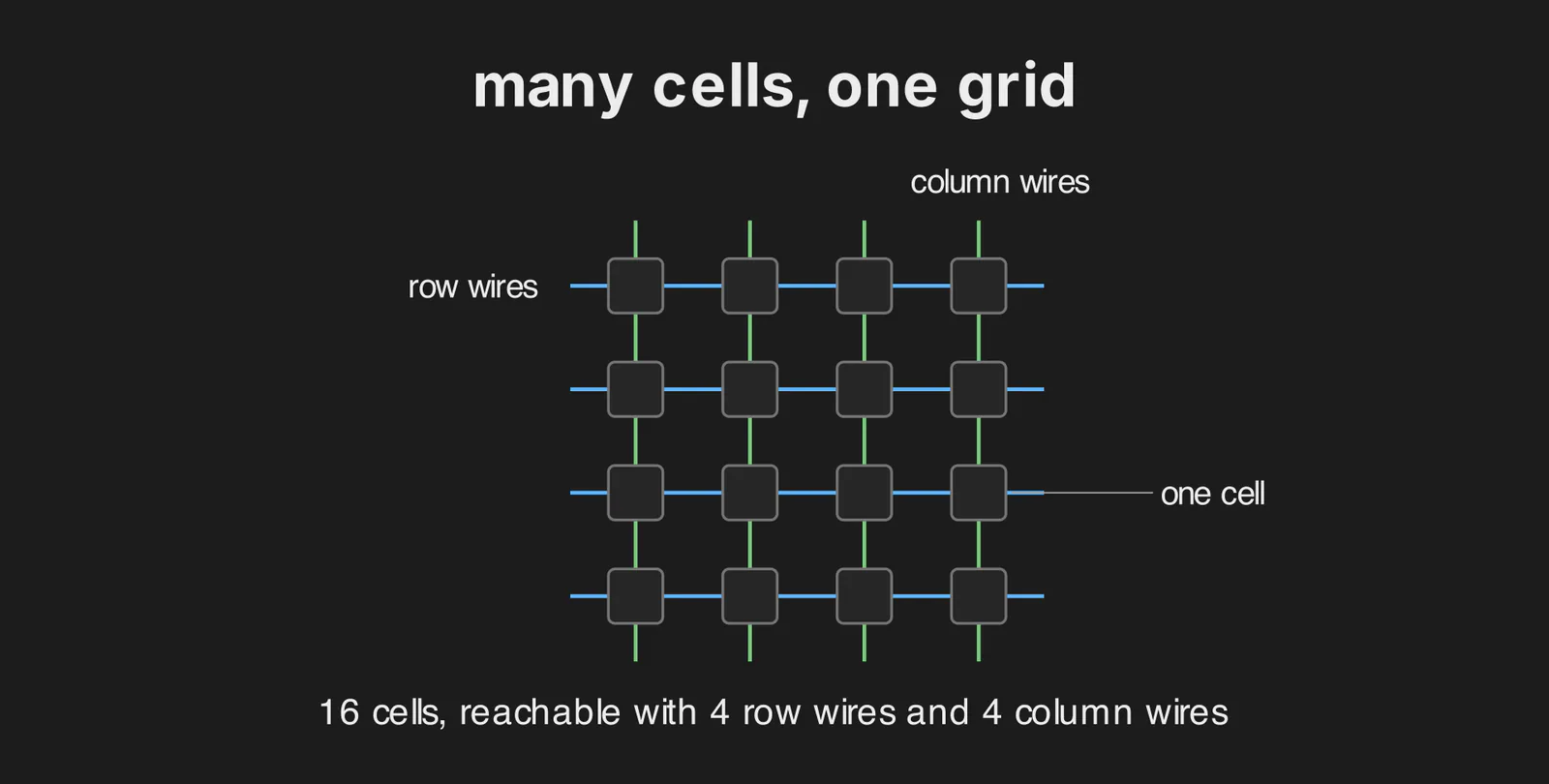
Which wire picks the row? The row wire is what we've been calling the control wire, and its proper name is the wordline. There's one wordline per row. It runs horizontally through the gate of every cell in its row, and a pulse on it opens all of those gates at once.
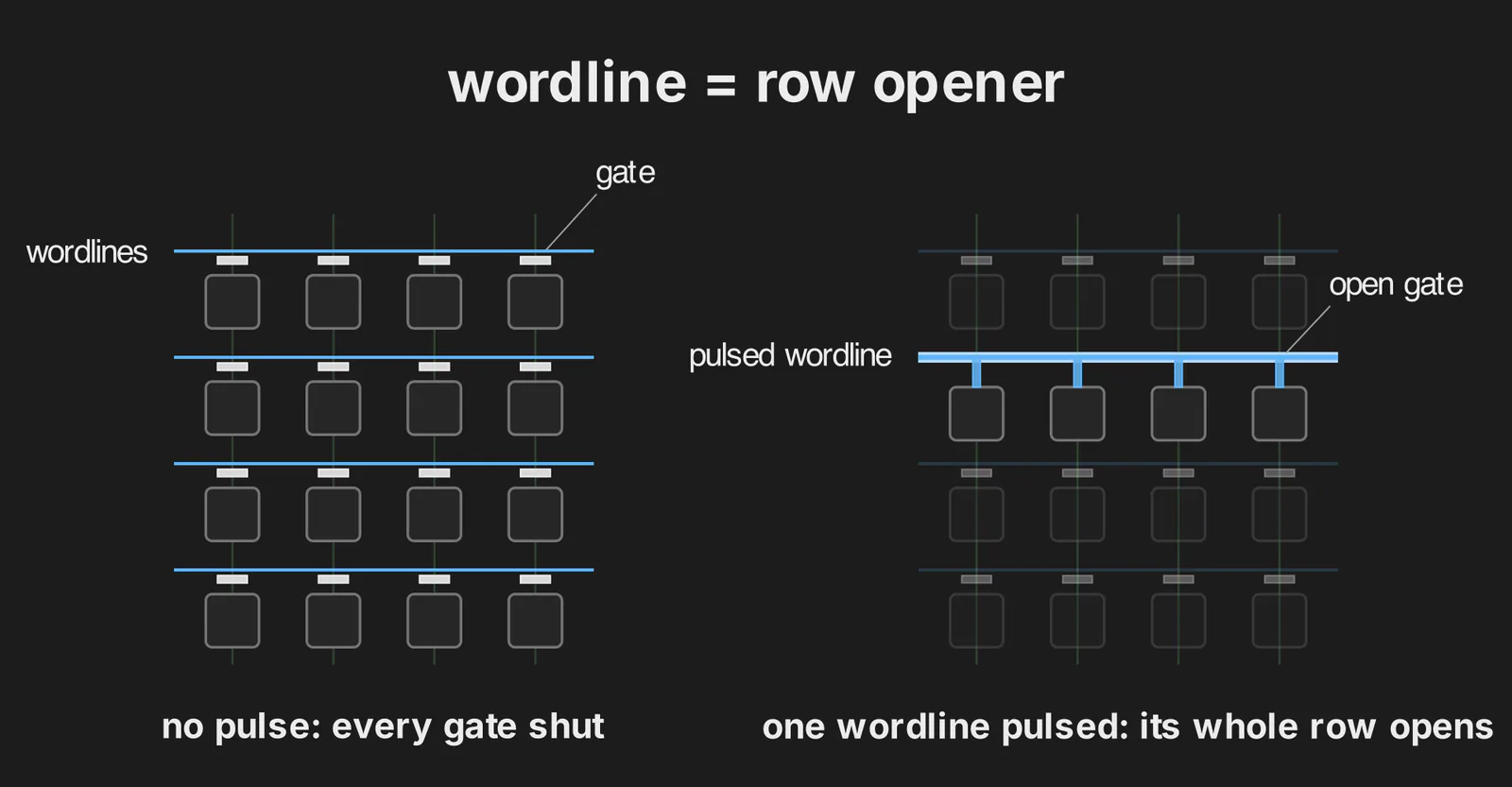
A wordline is a row-wide trigger and only a row-wide trigger.
So DRAM doesn't behave like an array of independent boxes. The natural unit of access is the row: you can't open one cell without opening every other cell on its wordline too.
Now the column, which we've already met: it's the data wire from before, and its proper name is the bitline. There's one bitline per column. It runs vertically through every gate in its column and continues down past the cells to a detector of its own at the bottom.
Can a bitline pick a cell on its own? No. It only hears a cell whose gate is open, and it has no say over which gates open. That's the wordline's job, and we just saw that a wordline opens a whole row, so every detector along the bottom gets its own cell's charge at the same moment.
So the wordline does the heavy half of the addressing trick, waking a whole row. The column is the light half: out of all those detectors, we pick the one we want to read.
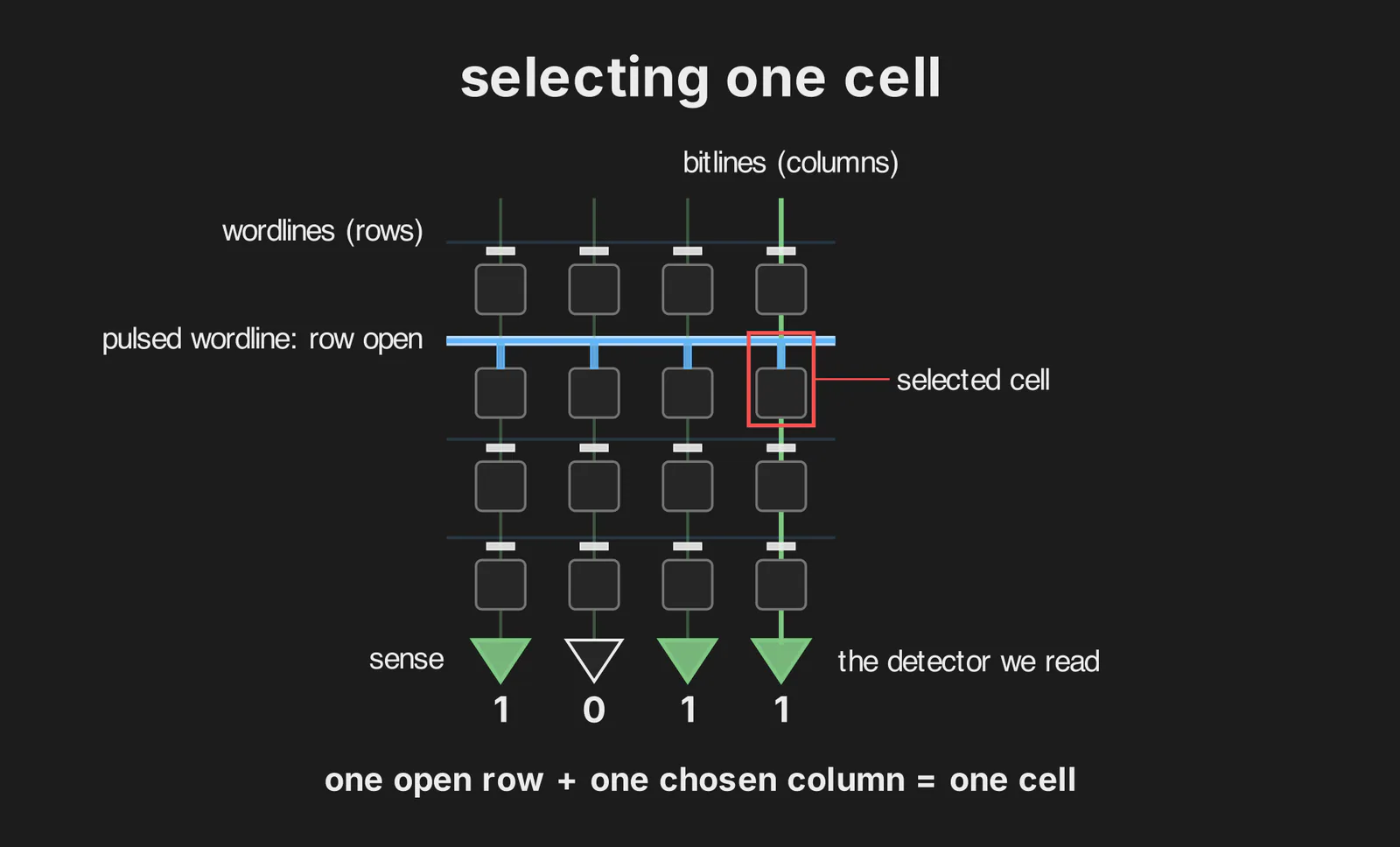
That's the cell we picked. The rest of the row isn't wasted, though. Its detectors are still holding what the other cells stored, so if our next read is from the same row, we skip opening it and just pick a different detector. Any memory controller worth the silicon keeps requests on a row that's already open. That's row-buffer localityHennessy & Patterson, Computer Architecture: A Quantitative Approach (6th ed., 2017), chapter 2, is where the open row (the row buffer) and the bandwidth and latency arc behind the DDR generations get their proper treatment. It's the cross-reference the rest of the series leans on..
How many wires did that save us? A 4×4 grid picks 1 of 16 cells with 4 + 4 = 8 wires instead of 16, and the saving grows with the gridOur 4 × 4 is the small case of r rows and c columns costing r + c wires for r × c cells. At 1,024 rows and columns, 1,024 + 1,024 = 2,048 wires reach 1,024 × 1,024 = 1,048,576 cells.: a million cells cost about two thousand wires, because every cell sits at exactly one row-column intersection.
From cartoon to circuit
We've been treating the gate as one thing that's either open or closed. Up close it has three distinct sides, and engineers use one-letter names for them.
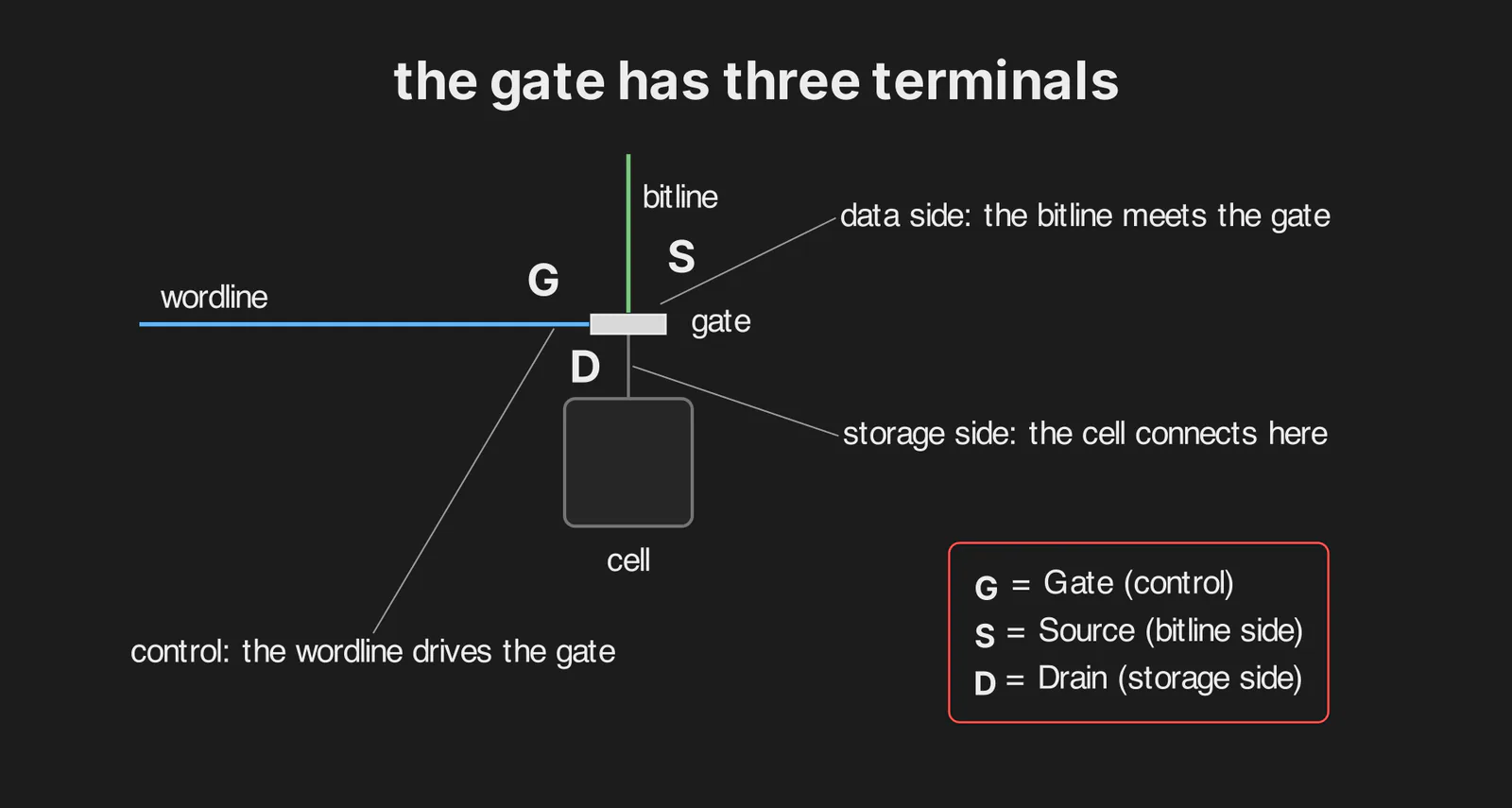
In plain English: the control side is where the wordline drives the gate, the data side is where the bitline meets it, and the storage side is where the cell connects. The one-letter versions are G for gate, S for source (the bitline side) and D for drain (the side where the bucket hangs)In a symmetric access transistor those two sides swap roles depending on which way the charge is flowing, so treat S and D here as labels for our drawing, not a law.. Yes, one side of the gate is called the gate. Our cartoon door is really the whole switch, and only its control side keeps the name. From here on every schematic uses G, S, D, and we already know which wire connects to which letter.
Now we swap the cartoon for the real symbols. The "gate" becomes a MOSFET, a transistor we switch on and off with a voltage on G, drawn with terminals G, S, D. The "bucket" becomes a capacitor: two plates separated by an insulator.
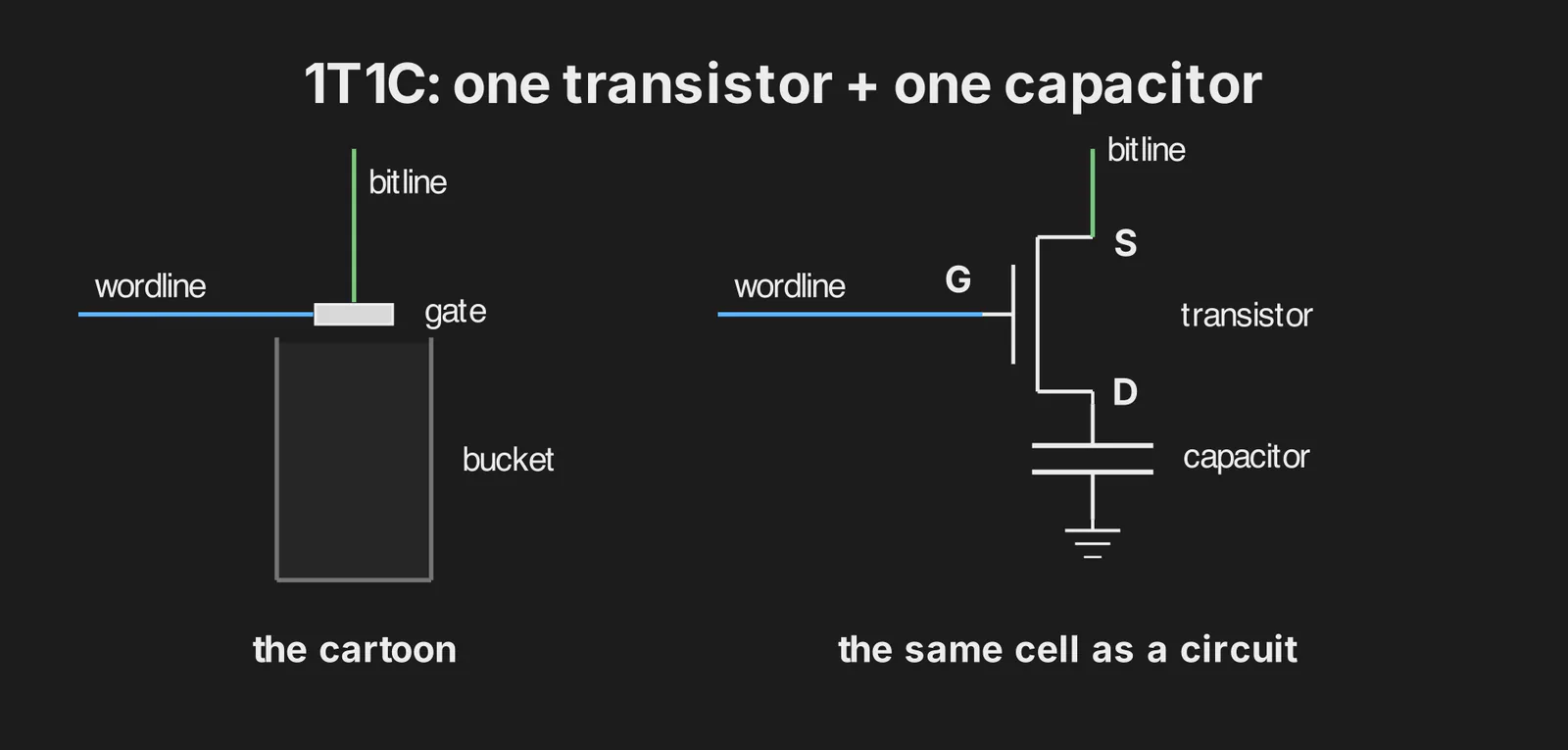
One transistor, one capacitor per cell. That's the 1T1C cell from the opening. To read the schematic: the wordline drives G and decides whether anything can flow between S and D. The bitline connects to S. D connects to the capacitor that holds the bit, and the capacitor's other plate sits at a fixed reference voltage, ground in the drawing and a half-voltage in a real chipReal chips hold that plate at half the supply voltage. Whichever value is stored, the thin insulator between the plates then only ever sees half the supply across it. The drawing uses ground because that's the symbol you'll meet in every textbook..
Two boxes and three wires. Every figure above was a cartoon of this drawing.
How much charge are we actually talking about? A modern cell capacitor is 10 femtofarads or less. Charge it to about a volt and you've stored 10⁻¹⁴ coulombs at the very most, some 60,000 electronsCharge is capacitance times voltage, so our 10 fF cell holds 10 fF × 1 V = 10⁻¹⁴ C. One electron carries 1.6 × 10⁻¹⁹ C, and 10⁻¹⁴ / (1.6 × 10⁻¹⁹) ≈ 62,500 electrons. TechInsights puts cells under 10 fF since the 2020-era nodes and expects them to shrink toward 5 or 6 fF, so the real count is lower still.. That's the entire difference between a 1 and a 0, and it's why the detector at the end of the bitline has to be so careful about what it calls a 1.
What this sets up
The rest of the memory series is this same primitive run under increasing pressure: we pulse a wordline, listen on a bitline, and decide whether the small disturbance counts as a 1.
Each generation runs that faster, more in parallel, and with a narrower safe window. Asynchronous DRAM, FPM and EDOFPM is fast page mode and EDO is extended data out, the two late-asynchronous tricks for reading several columns out of one open row without paying for the row again. Both get their own post. expose the raw operations (open a row, read a column, precharge the bitlines for the next row) before anything is synchronous. SDRAM puts those commands on a clock. The DDR generations push more data through the external pins with deeper prefetch, longer bursts, more banks, strobes and tighter timing budgets.
By DDR4 the timing windows at those pins are narrow enough that the chip and controller train voltages and sample times at boot, and DDR5 adds more knobs to train. If you've ever opened a BIOS overclocking page and wondered why there are so many Vref knobs, they're tuning exactly that link between the chip and the controller. LPDDR6 has to chase bandwidth under a mobile power budget. None of those posts are written yet, but that's the roadmap.
If you want the matter underneath the schematic (what doped silicon actually is, how a transistor and capacitor are physically grown), read the foundation post on silicon, ingots and photolithography.